Requires Java
The MDO Transporter is a Java based, multi-platform application for the transfer of files to and from My Docs Online. The only system requirement to run the MDO Transporter is Java 5.0 or higher.MDO Transporter
BETA Release 0.1 For Windows XP, Vista, and Mac OS X
The My Docs Online Transporter is the newest, fastest way to move files to and from your My Docs Online account.
To use the MDO Transporter to transfer files to/from your My Docs Online account please click the following link:
Current features include:
- Drag and drop option to easily copy files or folders directly into your My Docs Online account
- Browse to locate and select files or folders for upload to My Docs Online (including subfolders)
- Download folders (including subfolders)
- Download files
- Compression of files for faster file uploads
- SECURE. SSL Encryption ensures file privacy during transport
- Menu options to switch between Upload and Download, switch IDs, and refresh folder lists
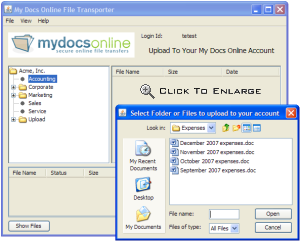
After logging in to the MDO Transporter there are two ways to upload files and folders into your account, and one way to download files and folders from your account.
Upload Method 1 - Simply drag and drop files or folders onto the correct folder in your My Docs Online account.
Upload Method 2 - First select the target folder from the folder list on the left side of the screen. Then click the browse button to select the files or folders you wish to upload and click the Open button
Downloading Files - First select the source My Docs Online folder from the folder list on the left side of the screen. Click "Show Files" then select the file(s) to download from the list on the right. Click "Download Files" to select the destination folder on your PC or Mac and click the Open button
Downloading Folders - First select the source My Docs Online folder from the folder list on the left side of the screen. Click "Download Folder" to select the destination folder on your PC or Mac and click the Open button
Problems? Questions? Email us.
